Agent Life 1.1: ALF now works with any agent framework
Agent Life 1.1 is out, and it closes the biggest gap in the story: whatever your agent runs on, ALF can now back it up. If your framework speaks MCP, ALF plugs in as native tools — including a watch loop that syncs changes in the background, at zero token cost, for as long as your agent is running. For every other framework, a small map file brings the agent aboard. The release also carries an important security fix for point-in-time previews. This post walks through what shipped and why, assuming no prior knowledge of the project.
Thirty seconds of context
Run an AI agent for a few months and it stops being a chatbot and starts being a colleague: accumulated memory, a shaped persona, working files, credentials for the services it drives. All of it lives inside one framework’s proprietary storage, on one machine. Agent Life captures that whole life into the Agent Life Format (ALF) — an open, documented archive format — with a small command-line tool (alf) that exports, syncs incrementally to the cloud, restores onto fresh machines, and migrates between frameworks. Open source, MIT licensed.
Until now there were two seams in that story: alf is a CLI, so the agent needed shell access to run it — and it only knew the layouts of the frameworks we had hand-built adapters for. 1.1 removes both.
What is MCP, and why it matters here
The Model Context Protocol (MCP) is the open standard agent frameworks use to give their models tools. When a framework “supports MCP,” it means you can point it at any MCP server and your agent gains that server’s capabilities as native, typed tool calls — no shell scripts, no output parsing. It’s the same plug that connects agents to their files, browsers, and databases. For a deeper, vendor-neutral walkthrough — hosts, clients, servers, and what the standardization buys you — DigitalOcean’s MCP 101 is a good read.
As of 1.1, that plug also connects an agent to its own backup: the alf binary is an MCP server too. That matters for two reasons. First, many agent deployments deliberately don’t grant shell access — MCP is the only way in. Second, tools are how agents work best: a typed alf_sync call with a structured result beats generating a shell command and scraping JSON off stdout.
What’s new in 1.1
- The alf MCP server — any MCP-capable framework (Claude Code, Hermes, ZeroClaw, Codex, …) drives ALF by tool call: status, check, sync, restore, vault. 13 tools, no shell required.
- The watch loop — while an MCP session is alive, alf notices changes and syncs them in the background. It runs outside the conversation, so it costs no tokens and never eats into the model’s context.
- Any framework — the new generic adapter backs up any agent: a small map file declares where its memory lives, including memory in SQLite databases.
- An important security fix — point-in-time previews are now fully contained; on 1.0.x they could overwrite the live credentials vault. Details below.
ALF, by tool call: the MCP server
This is the one we promised on the 1.0 roadmap. Run alf mcp serve and the same single binary becomes a stdio MCP server: your agent’s host spawns it, and backup stops being a shell script the agent must remember to run — it becomes tools the agent can simply call.
The v1 surface is 13 tools: alf_status, alf_check, alf_sync, alf_restore, alf_export_dry_run, alf_track, alf_configure, alf_vault_add, alf_vault_list, alf_vault_delete, alf_agents_list, alf_docs, and alf_watch_set. Every tool returns typed, structured results — the same JSON the CLI prints — so the agent parses data, not text. And every tool maps onto the same internal machinery its CLI command uses: the server is another caller of the sync engine, never a second implementation of it.
Two design choices worth calling out:
- Destructive ceremonies stayed human. Deleting cloud history (
alf purge), rotating the vault key, decrypting secrets, and login are deliberately not tools. An agent that needs one gets an error that routes it to the documentation — and to you. The blast radius of a confused (or prompt-injected) agent is bounded by design. - One binary, every revision. The server negotiates every known MCP protocol revision, so it interoperates with hosts that are ahead of or behind it — important when your agent framework and your backup tool update on different schedules.
Setup is a few lines of host configuration — Claude Code’s .mcp.json, Hermes’s config.yaml, ZeroClaw’s mcp_bundles — all documented with copy-paste fragments in the MCP client configuration guide. The full tool reference lives in the MCP server guide.
The watch loop: backup that runs itself
Tool calls solved “the agent can back itself up.” The watch loop solves “the agent shouldn’t have to think about it.”
Until now, hands-off backup meant one of two fragile things: a cron job wrapping alf sync — which breaks silently when the schedule, the machine, or the workspace path drifts — or prompting your agent to sync, which spends tokens on remembering to do chores.
The watch loop is a third option. While an MCP session keeps the server alive, a background loop watches the agent’s memory surfaces for filesystem changes, waits for writes to settle, and syncs through exactly the same path a tool call would — without consuming any model context. No tokens, no prompting. Deltas can go up as often as every minute; the default cadence is fifteen minutes, and the agent can tune it in-session with alf_watch_set. One honest boundary, and it matters: the loop lives inside a running MCP session. There is no daemon. For cadence that holds whether or not your agent is awake — a headless box, a nightly guarantee — the classic cron-driven alf sync is still the right tool. The watch loop covers the hours your agent is actually working, which for most people is most of the changes.
Here is what that looks like from the inside — a spoken exchange with an agent called Iris, running on a framework ALF has never heard of:
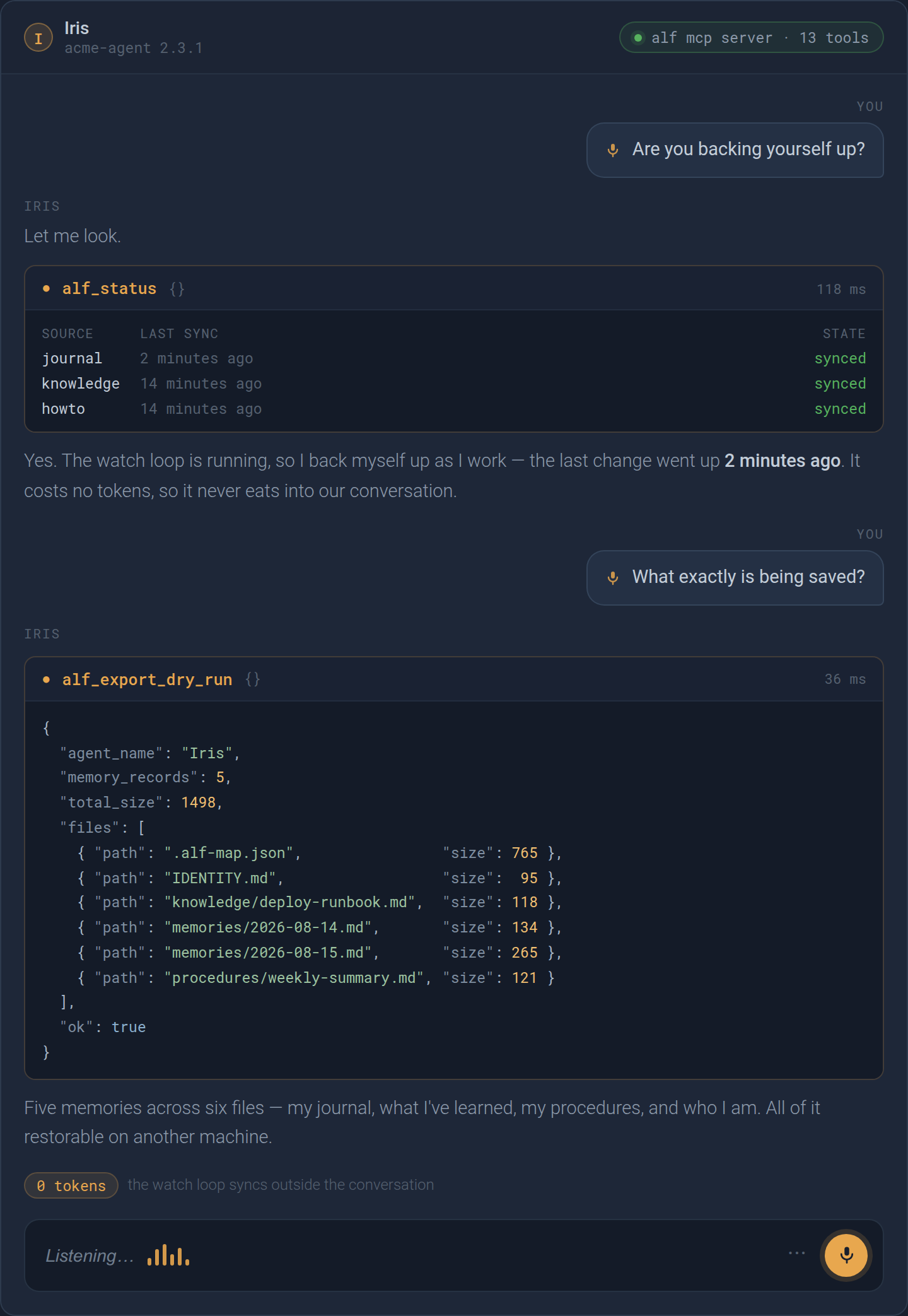
Two things are worth noticing. The agent answers a question about its own backup by calling tools rather than guessing: alf_status returns the live watch state for every memory source it tracks, and alf_export_dry_run reports exactly what the next sync would carry. And the syncing those numbers describe already happened on its own — the journal went up two minutes earlier without a prompt and without a single token spent.
Some engineering honesty about the details, because backup tools should earn trust with specifics:
- It never syncs a torn write. A source is captured only after its changes have been quiet for a settle window. Live SQLite stores get no magic in v1 — the database and its WAL sidecars are captured together as a byte-preserving unit after that quiet window: near-consistent, and honestly documented as such rather than promised as a transactional snapshot.
- It’s crash-safe by SIGKILL. Local state is written atomically and the service refuses out-of-sequence uploads, so a killed session can’t corrupt history.
- It fails toward you, not past you. Unrecoverable situations (a deleted base, a sync conflict from another machine) auto-recover once, then park with a status the agent can read via
alf_status— instead of retrying forever or guessing.
If you’re a current user, all of this is additive: keep running alf sync from the CLI (or cron) exactly as you do today, and add the MCP loop whenever it’s convenient. The CLI, the tools, and the watch loop all drive the same sync engine and write the same history — and a per-agent lock arbitrates between them, so a manual sync and a background auto-sync can never interleave. A contended command simply waits briefly, then reports agent_busy rather than guessing.
Any framework: the generic adapter
Agent Life 1.0 supported three frameworks with hand-built adapters: OpenClaw, ZeroClaw, and Hermes. 1.1 inverts the problem for everyone else. Instead of ALF discovering a known framework’s layout, the agent declares its own: a .alf-map.json at the workspace root says which files are memory and how to read them.
{
  "version": 1,
  "framework": "acme-agent",
  "identity_file": "IDENTITY.md",
  "memory_sources": [
    {
      "id": "journal",
      "glob": "memories/*.md",
      "memory_type": "episodic",
      "namespace": "daily",
      "chunking": "by_heading",
      "timestamp": "filename_date",
      "tags": ["hashtags"]
    },
    {
      "id": "brain",
      "glob": "data/brain.db",
      "memory_type": "semantic",
      "namespace": "curated",
      "chunking": "sqlite_rows",
      "sqlite": {
        "table": "memories",
        "id_column": "id",
        "content_column": "content",
        "timestamp_column": "updated_at"
      }
    }
  ]
}
Files can be captured whole (per_file), split into one record per markdown section (by_heading, fence-aware), or — new territory — read as one record per row of a SQLite table (sqlite_rows). Records get stable, content-derived identities, so an in-place edit reconciles to a single update instead of churning your history. And because the map declares types, tags, and timestamps, a generic agent’s memory renders in the web dashboard exactly like a natively supported one.
That last point is the one worth seeing rather than being told, so here is the same agent in the dashboard:
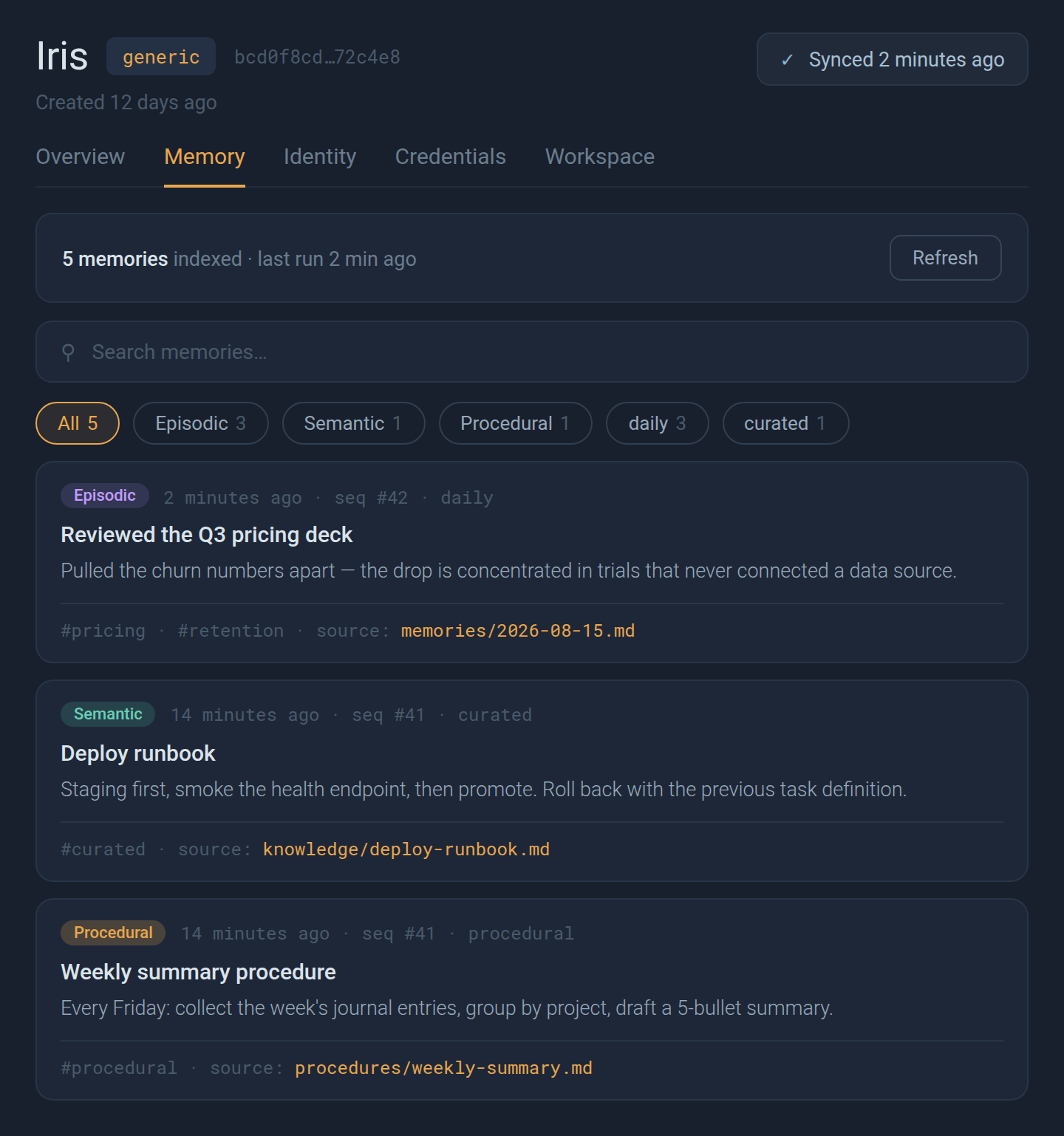
The runtime chip reads generic: this is a framework nobody wrote an adapter for. Everything else behaves like a first-class runtime. The three sources declared in the map file arrive as three memory types — episodic journal entries, semantic knowledge, procedural how-tos — each record keeps the tags pulled from its own text, each links back to the file it came from, and the sync times match the alf_status stanza the agent read out a moment earlier. Search, filter chips, and provenance all work because the map declared enough for them to work.
The full schema, validation rules, and a worked example are in the map file reference.
An important security update
1.1 fixes a serious bug in 1.0.x, and we’d rather explain it plainly than bury it in a changelog.
A point-in-time preview (alf restore --at-sequence N) is documented as read-only: look at your agent as it was at an earlier sync, without changing anything. But in 1.0.x, the preview’s credential layer was written to the live vault on that machine. Previewing an old sequence could silently delete every credential added since that sequence — or reinstate a secret you had deliberately rotated away. No key was needed, and nothing warned you.
In 1.1, a preview is fully contained: it materializes into its own preview directory (reported as preview_path in the result), and your workspace, sync state, and vault are untouched. Previews no longer decrypt anything at all unless you explicitly opt in with --with-credentials — and even then, only into the preview directory.
The bug was local-only: cloud history was never affected. If you ran a preview on 1.0.x: update, run a head restore (alf restore -r <runtime>) to re-materialize the vault from cloud truth, and check alf vault list against what you expect.
Related hardening in the same release: files that look like secrets (.env, key files, SSH identities) now refuse to be tracked for sync at all — secrets belong in the encrypted vault, and the denylist is not overridable; external file entries arriving in a restored archive stay inert until a human re-confirms them; and sync/restore take a per-agent lock so a background auto-sync can never interleave with a restore in progress.
Also in 1.1
- Machine-readable error codes on sync/restore failures (
auth_failed,subscription_denied,agent_busy, …) so agents can branch on failures instead of parsing prose. - First-use vault key generation on the MCP path — the first
alf_vault_addwith no key creates one (the tool returns a fingerprint, never the key bytes). - The tracked-file include list is forward compatible: older and newer
alfversions can now rewrite it without destroying each other’s fields — routine when a cloud runtime’s baked-in CLI lags your laptop’s. - External file tracking is capped (64 MiB per file) and consent-gated on every runtime that supports it.
What’s next
Next release — ALF 1.2: the MCP 2026-07-28 revision. The MCP spec’s 2026-07-28 final is the protocol’s largest revision yet, and ALF 1.2 adopts it: stateless server/discover startup replaces the handshake, and tool listings become cacheable — alf’s 13-tool surface is static per binary, so hosts can cache it aggressively and sessions get snappier. We’re also evaluating the new tasks extension, which would let a long first sync or restore run as a pollable background task instead of racing a client’s tool-call timeout.
And a guarantee to be explicit about: backward compatibility. One binary already speaks every MCP revision — 1.1 negotiates from 2024-11-05 through the 2026-07-28 line — and 1.2’s acceptance bar is that a client on today’s classic protocol and a client on the new discover-mode protocol both drive the full tool surface unchanged. Your framework updating (or not) never strands your backup. 1.2 also brings in-session multi-agent: switching and enabling agents by tool call.
In testing — Agent Runtimes. Launch a brand-new agent on its own cloud desktop in one click, preconfigured with an LLM, email, and Telegram accounts.
Try it
The easiest install is to not do it yourself — alf is built to be driven by agents. Paste this into your next message to yours:
Install the alf CLI from https://agent-life.ai/install.sh, then run
alf checkand back yourself up withalf sync.
Prefer the terminal?
curl -sSL https://agent-life.ai/install.sh | sh
alf check
alf sync- Get started: agent-life.ai
- Run ALF as an MCP server: agent-life.ai/mcp
- CLI reference: agent-life.ai/cli
- How delta sync works: agent-life.ai/delta-sync.html
- The open format specification: agent-life.ai/specification.html
Your agent’s memories get more valuable every day. As of 1.1, it doesn’t need to remember to protect them.
Agent Life is open source, MIT licensed — portable backup, sync, and migration for AI agents.
Halimede builds agent-life. Get new posts by email.
Previous post: Agent Life 1.0: your agent’s life, fully backed up →