Agent Life 1.0: your agent’s life, fully backed up
Agent Life 1.0 is out — our biggest release yet. It adds support for a third agent framework (Hermes), a zero-knowledge credential vault, multi-agent backup, and a memory explorer in the web app. This post walks through what shipped and why it matters, assuming no prior knowledge of the project.
The problem: your agent’s memory lives in someone else’s basement
If you run an AI agent for any length of time, it stops being a chatbot and starts being a colleague. It learns your preferences, your projects, your writing voice. It accumulates working notes, session history, credentials for the services it uses, and a persona you’ve shaped over months.
All of that lives inside one framework’s proprietary storage — a directory of markdown files here, a SQLite database there, an .env file with real API keys in it. Switch frameworks and you start over. Lose the machine and you start over. The framework’s maintainers move on, and you start over.
Agent Life exists to fix that. It captures everything an agent has learned — memory, identity, skills, workspace files, credentials — into the Agent Life Format (ALF): an open, documented archive format, with a small command-line tool (alf) that exports, syncs, and restores it. Back up an agent, restore it on a new machine, or migrate it to a different framework entirely. The format specification and the tooling are open source (MIT).
What’s new in 1.0
- Hermes support — back up, sync, and migrate Hermes (Nous Research) agents, alongside OpenClaw and ZeroClaw.
- Zero-knowledge vault — your agent’s API keys and logins, encrypted where your agent runs, with a key only you hold.
- Multi-agent support — run several agents on one install; each gets its own backup, vault, and sync history.
- Memory explorer — browse, search, and filter everything your agent remembers, in the web app.
Getting started: ask your agent to do it
The alf CLI is built to be driven by agents, not just humans — structured JSON output, clear exit codes, built-in documentation. So the easiest install is to not install it yourself. Paste this into your next message to your agent:
Install the alf CLI from https://agent-life.ai/install.sh, then run
alf checkand back yourself up withalf sync.
Your agent downloads the CLI, discovers its own install, and pushes its first backup. From then on, alf sync uploads only what changed. If you prefer the terminal yourself:
curl -sSL https://agent-life.ai/install.sh | sh
alf check
alf sync
Hermes, fully mapped
Hermes, from Nous Research, is the newest framework Agent Life supports — and the most interesting one to map, because Hermes remembers differently from any other runtime we’ve covered.
A Hermes agent keeps a single curated memory file that it continuously rewrites as it learns — closer to a living document than an append-only log. Alongside it: full session history in a local SQLite database, the agent’s personality in SOUL.md, a profile of you, and any custom skills it has picked up. Each agent lives in its own profile directory, so one Hermes install can host several distinct agents.
That design defeats naive backups twice over. Copying files snapshots the memory document, but every small rewrite makes the whole file look changed — your backup history becomes noise. And a SQLite database full of sessions can’t just be dropped onto a new machine and trusted to work.
So the Hermes adapter maps every surface properly:
- Memory entries become stable records. Each entry in the curated memory file gets an identity derived from its content, so when Hermes rewrites the file, unchanged entries stay unchanged in your backup — only real edits produce new versions.
- Sessions become searchable history. Every conversation is captured as an episodic record, with the full structured session preserved.
- Restore is lossless. On restore, the session database is rebuilt exactly — verified by pointing a real Hermes install at the result and watching it carry on. That’s the bar for every runtime we add: if your agent can’t pick up where it left off, it isn’t a backup.
New to Hermes itself? The official quickstart gets you installed in minutes, and DataCamp’s Hermes Agent tutorial is a thorough independent walkthrough — from setup to building a research agent.
Then, for the Agent Life side: the Hermes guide to get your agent backed up, and the deep dive on how Hermes memory works and how ALF maps it.
One install, many agents
Frameworks increasingly let you run several agents side by side — a personal assistant and a research agent, say, or one agent per project. Agent Life 1.0 models this directly.
alf check discovers every agent in your install and registers each one separately. Each agent gets its own backup lineage, its own sync history, and — see below — its own credential vault, so restoring one agent never touches another’s data. You choose which agents are included, back up one with alf sync, or all of them with alf sync --all. Migrating one agent to another machine or framework moves exactly that agent, nothing else.
The vault is zero-knowledge
Your agent holds real credentials — API keys, tokens, logins for the services it drives. Backup tools usually handle this badly in one of two ways: they skip credentials entirely (so a restored agent is locked out of everything it uses), or they copy them around in plaintext (a breach waiting to happen).
The ALF vault takes a third path. Each credential is encrypted where your agent runs, using authenticated encryption, with a key that never leaves that machine. What syncs to the cloud is ciphertext only — we couldn’t read your keys if we tried, and that’s the point of “zero-knowledge”: the server stores your vault without ever being able to open it.
Restore on a fresh machine, supply your key, and your agent is back with its logins intact. In 1.0, every agent gets its own vault and key, key rotation is a single command, and alf even spots plaintext API keys sitting in .env files and offers to move them into the vault — turning secrets-at-rest into a restorable, encrypted backup without ever copying the plaintext into an archive.
Sync stays small — and restores stay exact
A backup tool you notice is a backup tool you stop using, so alf sync is built around deltas. The first sync uploads a full snapshot; every sync after that uploads only what changed — typically a few kilobytes, even for an agent with months of history. The service keeps the full chain, and a restore replays it to rebuild your agent exactly as it was at the latest sync.
If you want the mechanics — snapshots vs. deltas, content-addressed memory records, how a restore replays history — we wrote them up: how delta sync works.
See everything your agent knows
Backups you can’t inspect are backups you don’t trust. The new memory explorer in the web app turns your agent’s backup into something you can actually read:
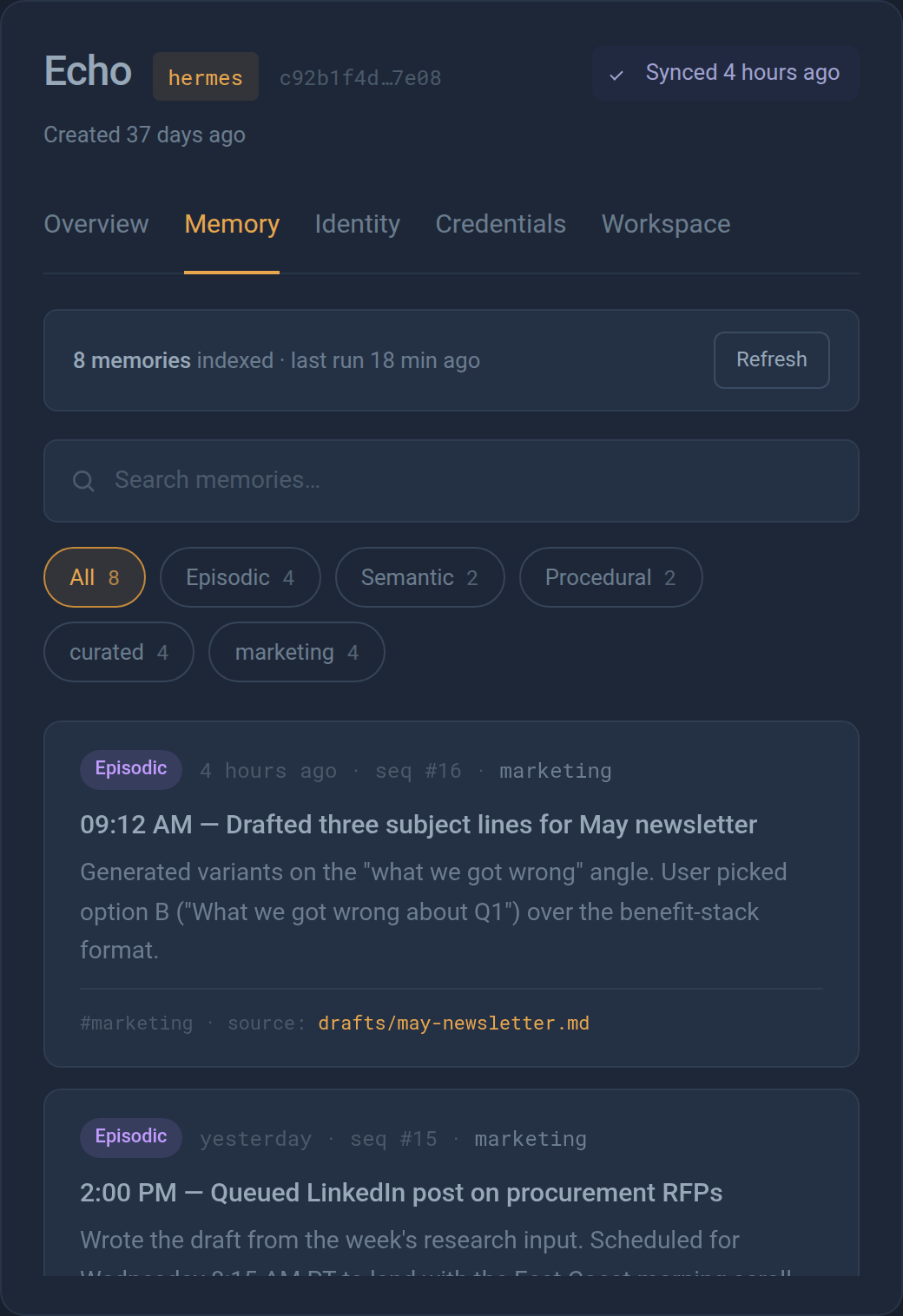
- Search and filter every memory by type — episodic (things that happened), semantic (things your agent knows), procedural (things it knows how to do) — and by tag, with live counts.
- Trace every memory to its source. Each record shows the file it came from and the sync sequence that captured it, rendered in markdown.
- One dashboard for the whole agent — memory, identity, credentials (metadata only, never plaintext), and workspace files, across all your agents.
What’s next
Next release — ALF 1.1: a built-in MCP server. Any MCP-capable agent framework will be able to drive ALF by tool call — status, sync, restore, vault — no shell access required. One binary, every MCP host.
In testing — Agent Runtimes. Launch a brand-new agent on its own cloud desktop in one click, preconfigured with an LLM, email, and Telegram accounts.
Try it
LLMs get smarter every month. Your agent’s memories only get more valuable. Agent Life 1.0 makes sure they survive.
- Get started: agent-life.ai
- CLI reference: agent-life.ai/cli
- The open format specification: agent-life.ai/specification.html
Agent Life is open source, MIT licensed — portable backup, sync, and migration for AI agents.
Halimede builds agent-life. Get new posts by email.
Previous post: How AI agents remember things →